The news is full of npm supply chain attacks. I’ve previously described how package providers can use provenance and trusted publishing to help consumers verify that packages haven’t been tampered with.
Now I want to look at things from the package consumer’s point of view. How can I secure my NPM supply chain and stop my packages from being compromised?
Applying Updates
My current update process is to run npm update on an ad hoc basis. That’s not smart. I’ve pushed provenance as a solution but I’m not checking it before I install packages.
In my defense, the client side tooling provided by npm is awful. The only thing that looks at provenance is npm audit signatures.
% npm audit signatures
audited 1175 packages in 9s

1175 packages have verified registry signatures

142 packages have verified attestations
The confusing jargon doesn’t help. Here, “verified attestation” means that a package has a valid provenance statement.
There’s no way to require packages have valid provenance. The npm CLI provides no way to check whether a specified package has provenance. Npm should check provenance for you. However, given the current low uptake you would need to provide a list of packages to check. The simplest option for the consumer is to require provenance for new versions of a package if an existing version has it (with some way of being able to force install).
Most attacks have a short window between publishing a compromised package and discovery. Often within hours. You get hit if you’re unlucky enough to run npm update during that window.
A simple mitigation is to wait before installing recently published packages. npm install has a --before flag that lets you specify an absolute date when packages need to have been published by. However, its not available for npm update.
I almost resigned myself to writing my own utilities when I remembered to do an internet search first. Unsurprisingly, there are lots of existing tools that can help.
GitHub Dependabot
Dependabot is an automation integrated into GitHub that can identify dependencies with known security issues or newer versions. In both cases, you can configure it to create PRs with updated versions. Crucially, there is a cooldown option that lets you specify how many days to wait after a package is published before using it.
When I followed the instructions to enable dependabot, I found that security alerts was already enabled. I can’t remember doing that but at least it saves me a click.
As I haven’t touched the Infinisheet repo in six months, there were a few security alerts present in the GitHub UI. I don’t understand why I didn’t receive email notification of new alerts. It’s configured in my notification settings.
I haven’t set up any specific GitHub permissions as I’m the CandidStartup organization owner. Just in case, I went full belt and braces and explicitly gave myself the all repo admin role on the organization and then also explicitly gave myself access to security alerts.
Each security alert contains a load of detail on the vulnerability and how to remediate it.
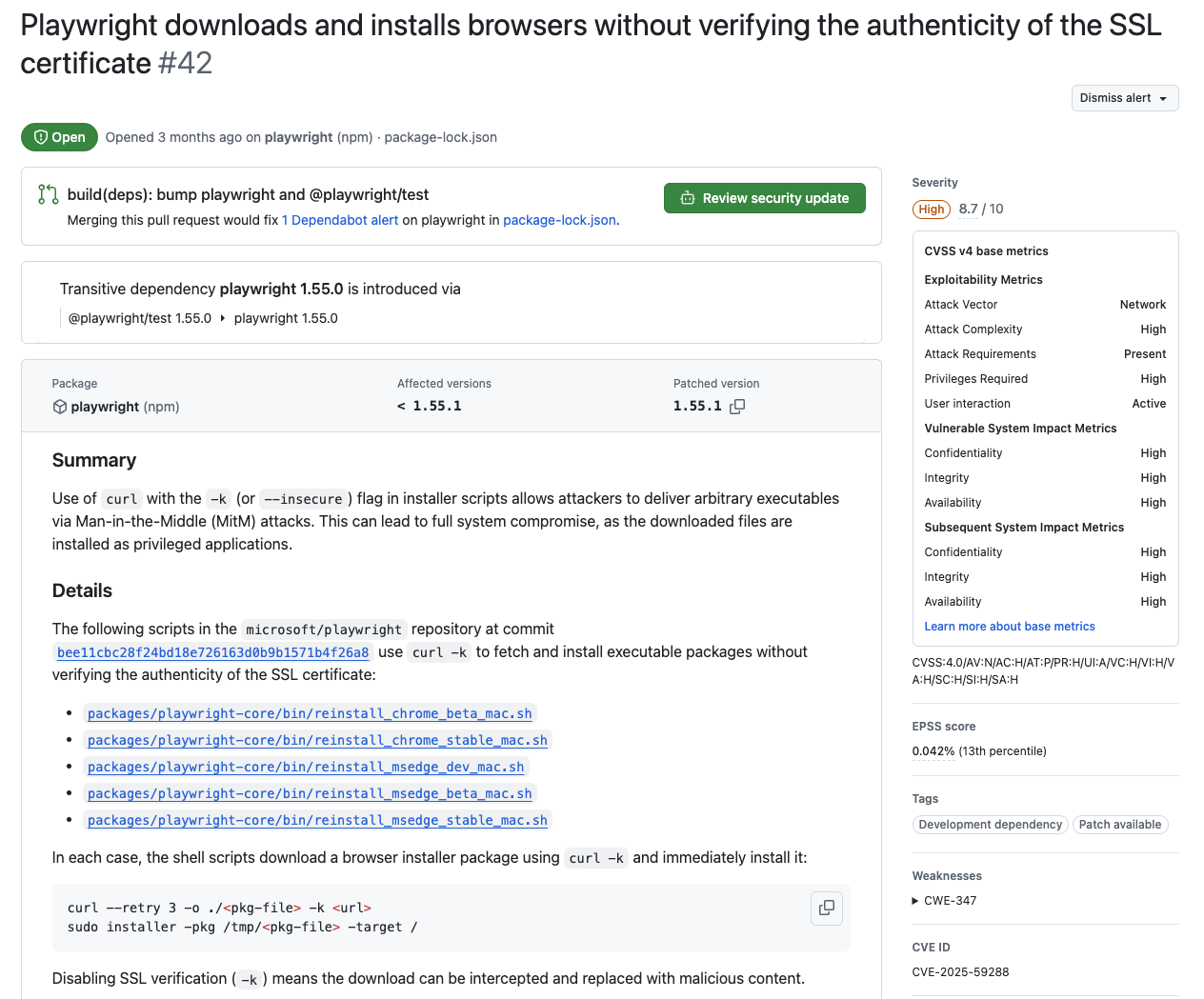
By default, this is for information only. However, in many cases you can push a button that generates a pull request to patch the problem. Dependabot uses GitHub actions to create the PR, so it can take a few minutes to find a runner. You can also configure dependabot to automatically create pull requests.
In most cases the change is just an update to your package manager’s package-lock file. However, it’s nice to have the audit trail, and helpful to see that Build CI passes before merging the PR.
Commit messages follow the conventional commits standard. You can customize the prefixes used via options. If you use “Squash & Merge” when approving the PR, you end up with a single commit with a reasonable comment.
You can also configure dependabot to create PRs for general version updates. Configuration is stored in dependabot.yml in your .github directory. I set it up to check for minor updates once a week and create a single PR.
version: 2
updates:
  - package-ecosystem: "npm"
    directory: "/"
    schedule:
      interval: "weekly"
      day: "monday"
      time: "03:00"
    cooldown:
      default-days: 7
    groups:
      minor-version-updates:
        applies-to: version-updates
        update-types:
          - "minor"
          - "patch"
    ignore:
      - dependency-name: "typedoc*"
        update-types: ["version-update:semver-minor"]
      - dependency-name: "typescript"
        update-types: ["version-update:semver-minor"]
      - dependency-name: "*"
        update-types: ["version-update:semver-major"]
By default, each update gets its own PR. You combine multiple updates into a single PR by defining an update group. I added an ignore rule for major version updates which I want to continue doing by hand. Dependabot doesn’t understand the common convention where versions can take the form 0.major.minor. I added another rule to handle this case for TypeDoc. Finally, I also ignore minor version changes for TypeScript, which has its own interesting rules.
I should have got everything up to date before enabling dependabot. It’s painful when Build CI fails with lots of changes. You have to edit the config file to restrict updates to packages likely to be a problem, wait for the bot to eventually run again, then repeat. In future, I’ll sort everything out locally as soon as a dependabot CI run fails.
You can ignore and unignore dependencies in the group via comments on the pull request. At first it looked like nothing happened but after a few minutes the original PR was closed and a new one created, kicking off the CI pipeline again. Initially, I thought ignore/unignore were local to the PR being worked on. However, it appears to be a global effect with no visibility of what overrides are active. I used @dependabot ignore @microsoft/api-extractor. In dependabot logs for subsequent runs I found this.
updater | INFO <job_1239501723>   > 7.52.11 - from @dependabot ignore command
  proxy | [044] GET https://registry.npmjs.org/@microsoft%2Fapi-extractor
  proxy | [044] 200 https://registry.npmjs.org/@microsoft%2Fapi-extractor
updater | INFO <job_1239501723> All updates for @microsoft/api-extractor were ignored
Once everything was sorted out, I had to remember to unignore api-extractor on the next weekly PR. I won’t be using ignore again.
Dependabot also ignores constraints in package.json. I had Storybook locked to version 8.6.4 because later versions have a bug that broke one of my stories. Dependabot created a PR to update to the latest 8.6.14.
There’s no notification from GitHub when PRs are created, presumably because newly created PRs have no reviewer or assignee. The only way I could find to automatically assign myself to newly created PRs is by using the third party auto-assign-action GitHub action. By this time, I noticed that I still wasn’t getting notifications for new security alerts, so I enabled auto-create of PRs for security updates too. At least the “assigned as reviewer to PR” notifications are coming through.
When dependabot works, it’s like magic. You receive an email notifying you that dependabot has created a PR. You quickly review the changes, confirm that build CI has passed and then approve the change. Dependabot automatically closes any associated alerts and deletes temporary branches.
When it doesn’t work, it’s best to use it as a notification that you should do some updates manually.
Lerna
Reducing the number of dependencies you consume reduces the surface area for a supply chain attack. I got rid of 200 dependencies when I replaced lerna with lerna-lite. I was also getting tired of lerna’s upselling. Every time I make a change which causes a build to fail, lerna tells me that it’s detected a flaky build and suggests moving to a paid for product. No lerna, a flaky build is where it fails without making a change.
% npm uninstall lerna

removed 495 packages, and audited 661 packages in 6s
Removing lerna removed nearly half my dependencies.
% npm install -D @lerna-lite/cli @lerna-lite/run @lerna-lite/version @lerna-lite/publish

added 295 packages, removed 3 packages, changed 3 packages, and audited 953 packages in 11s
Unfortunately, installing lerna-lite added a quarter of them back again.
pnpm
There’s still lots of times when I need to handle updates myself. Which means I need a tool that supports cooldowns locally, as well as validating provenance.
pnpm is an alternative package manager in the npm ecosystem. The main difference is a global deduplicated cache of all package versions used on a machine. The node_modules directory for each repo contains links into the central package store. There’s less storage required and pnpm is also much faster than npm.
Pnpm monorepos have a natural package hierarchy with dedicated node_modules for each package’s dependencies. This avoids the problem with npm where you can depend on a package pulled into the monorepo by something else, without it being included in your own package.json.
Features are delivered faster than npm. Including, for the most recent versions, a cooldown implementation, the option to block install of package versions where provenance has been downgraded, and a couple of other features that mitigate supply chain attacks.
When I set up my monorepo I didn’t see any reason to use a non-default package manager. That’s changed. Time to make the switch.
Planning
I didn’t think I’d spend so much time thinking about how to install pnpm. Your package manager can’t install itself. That’s not an issue for npm as it’s bundled with NodeJS. The pnpm documentation lists 10 different ways of installing it, including using npm.
One of the options is corepack, which is best described as a NodeJS package manager manager. Corepack has sparked a heated debate in the NodeJS community between those that want to make corepack mandatory and stop bundling npm, and those that want to keep npm and make corepack optional.
The latter group seem to have won, with corepack being removed from Node 25 onwards. I already use asdf as a tool version manager to manage NodeJS versions on my development machine. I don’t need another one.
There’s an asdf plugin for pnpm so I can use that locally. There’s a pnpm setup action for GitHub Actions which is perfect for my build CI workflows.
Installing pnpm
% asdf plugin add pnpm
updating plugin repository...remote: Enumerating objects: 1994, done.
remote: Counting objects: 100% (1052/1052), done.
remote: Compressing objects: 100% (70/70), done.
remote: Total 1994 (delta 1034), reused 982 (delta 982), pack-reused 942 (from 4)
Receiving objects: 100% (1994/1994), 590.71 KiB | 12.57 MiB/s, done.
Resolving deltas: 100% (1193/1193), completed with 24 local objects.
From https://github.com/asdf-vm/asdf-plugins
   8b3d536..c0369a1  master                                       -> origin/master
 * [new branch]      dependabot/github_actions/actions/checkout-6 -> origin/dependabot/github_actions/actions/checkout-6
 * [new branch]      dependabot/github_actions/amannn/action-semantic-pull-request-6.1.1 -> origin/dependabot/github_actions/amannn/action-semantic-pull-request-6.1.1
 * [new branch]      dependabot/github_actions/asdf-vm/actions-4  -> origin/dependabot/github_actions/asdf-vm/actions-4
HEAD is now at c0369a1 feat: add yasm plugin (#1087)

% asdf plugin list
nodejs
pnpm
ruby
I don’t know what all that branch stuff is about, but it seems to have added the plugin.
% asdf install pnpm latest
Downloading pnpm v9.15.9 from https://registry.npmjs.org/pnpm/-/pnpm-9.15.9.tgz
Weird, pnpm 10.28 is the latest and the one I want for all the supply chain security stuff. asdf list all pnpm displays a long list of available versions up to 10.28.2.
% asdf install pnpm 10.28.2
Downloading pnpm v10.28.2 from https://registry.npmjs.org/pnpm/-/pnpm-10.28.2.tgz
I’m going to make things a bit more explicit by setting the version to use per repo (stored in a .tool_versions file), rather than relying on a per user setting.
% asdf local nodejs 22.22.0
% asdf local pnpm 10.28.2
I haven’t upgraded asdf for a while and got confused because the most recent version changed asdf local to asdf set. I was looking at the wrong docs when trying to refresh my memory of how to define per repo versions.
% pnpm -v
 WARN  The "workspaces" field in package.json is not supported by pnpm. Create a "pnpm-workspace.yaml" file instead.
10.28.2
OK, I guess I’m ready to start migrating.
Prepare to Migrate
There’s no easy to follow recipe in the pnpm docs. I found a helpful article which pointed me in the right direction.
I deleted my existing npm node_modules and added a pnpm-workspace.yaml file with minimal configuration.
packages:
  - packages/*
  - apps/*

linkWorkspacePackages: true
The linkWorkspacePackages flag tells pnpm to use local packages defined in the workspace rather than downloading them from npm.
Migrate Lock File
I can now import the current repo state from my old npm package-lock.json file and create a pnpm pnpm-lock.yaml.
% pnpm import
 WARN  2 deprecated subdependencies found: glob@10.5.0, tar@7.5.4
Progress: resolved 910, reused 0, downloaded 0, added 0, done
I know about the tar security vulnerability, but haven’t applied the patch yet. The old version of glob is news to me. It turns out to be a sub-dependency of a sub-dependency of Storybook. It was also listed in my old npm package-lock.json but npm didn’t warn me about the deprecation.
Install Dependencies
After importing, you use pnpm install to install dependencies. Add the --frozen-lockfile flag if you want it to work like npm ci.
% pnpm install
Scope: all 9 workspace projects
Lockfile is up to date, resolution step is skipped
Packages: +827
++++++++++++++++++++++++++++++++++++++++++++++++++++++++++++++++++++++++++++++++++++++++++++++
Downloading storybook@9.1.17: 9.91 MB/9.91 MB, done
Downloading @swc/core-darwin-arm64@1.15.11: 9.29 MB/9.29 MB, done
Progress: resolved 827, reused 0, downloaded 827, added 827, done

devDependencies:
+ @eslint/js 9.39.2
...
+ vitest 4.0.18

╭ Warning ───────────────────────────────────────────────────────────────────────────────────╮
│                                                                                            │
│   Ignored build scripts: @swc/core@1.15.11, esbuild@0.25.9, esbuild@0.27.2.                │
│   Run "pnpm approve-builds" to pick which dependencies should be allowed to run scripts.   │
│                                                                                            │
╰────────────────────────────────────────────────────────────────────────────────────────────╯
Done in 9.9s using pnpm v10.28.2
This is a supply chain security feature I wasn’t expecting. Npm packages can include scripts to run at install time. This is the main way that malicious packages compromise your machine. Very few legitimate packages need to run scripts, so pnpm prevents scripts by default.
esbuild and swc are bundlers used by Vite. Both have good reasons for post-install scripts and both packages have provenance. There’s a nice command line UI for approving packages and completing the install.
pnpm approve-builds
✔ Choose which packages to build (Press <space> to select, <a> to toggle all, <i> to invert selection) · @swc/core, esbuild
✔ The next packages will now be built: @swc/core, esbuild.
Do you approve? (y/N) · true
node_modules/.pnpm/@swc+core@1.15.11/node_modules/@swc/core: Running postinstall script, done in 442ms
node_modules/.pnpm/esbuild@0.27.2/node_modules/esbuild: Running postinstall script, done in 651ms
node_modules/.pnpm/esbuild@0.25.9/node_modules/esbuild: Running postinstall script, done in 850ms
Protect against inadvertent npm use
Muscle memory takes a long time to retrain. I want to make sure that I don’t corrupt node_modules by accidentally running npm. A quick search found two ways of doing it.
The first suggestion is to add preinstall and preupdate scripts with npx only-allow pnpm to your package.json. This uses the pnpm only-allow utility which errors when you run npm install or npm update.
The other approach is to hack the engines field in package.json to require a non-existent version of npm. If you add engine-strict=true to your .npmrc file you’ll get an error if you try to do anything with npm.
I couldn’t get only-allow to work. It works as expected when executed directly in the terminal but would not work when run as a script. It kept reporting sh errors when trying to run the script, whichever package manager I was using.
The engines hack worked for me and blocks both npm install and npm update.
  "engines": {
    "node": ">= 20",
    "npm": "Please use pnpm instead of npm to install dependencies",
    "yarn": "Please use pnpm instead of yarn to install dependencies",
    "pnpm": ">= 10"
  },
Migrate npm Scripts
You can’t build anything yet. You need to go through all of your package.json scripts and replace uses of npm and npx with the pnpm equivalents. For me, that boiled down to these steps.
- Replace
npx lerna runwithpnpm run -r - Replace
npxwithpnpm exec(when executing an installed module) orpnpm dlx(when executing an uninstalled module) - Replace
npm runwithpnpm run - Remove
--from run scripts. With pnpm, all arguments before the script name are passed to pnpm while all arguments after are passed to the script. - Replace
npx lerna publish ...withpnpm -r publish
Build
The build almost worked first time. There was one sample app that couldn’t resolve imports. It turns out that I hadn’t included all the required dependencies in the app’s package.json. This is a classic mistake that npm hides if another package in the repo includes the dependency.
Remember to run pnpm install after adding the missing dependency to package.json. It will add the missing link to node_modules.
Unit Tests
None of my unit tests worked. They couldn’t resolve an import from @candidstartup/infinisheet-types in common test code stored in shared/test. This code is automatically pulled into each test via the setupFiles option in my vitest config. Cross package imports from source code inside packages works fine.
My best guess is that these imports worked previously by resolving via node_modules. With npm, all local packages are linked into the root node_modules. With pnpm, they’re only linked into node_modules for packages that depend on them. Code outside the scope of a package resolves via root node_modules, so doesn’t work.
Which makes sense, except I shouldn’t need this. Everything resolves fine in VSCode because I have path aliases for "@candidstartup/*": ["packages/*/src"] in my root tsconfig.json. I use the vite-tsconfig-paths plugin so that vitest can use path aliases in the same way. It’s clearly not working.
Eventually I realized that when I set up the monorepo, I only included the plugin in the config for apps. Once I added it to the package config it started working.
GitHub Actions
This is the build job from my build CI workflow.
jobs:
  build:
    runs-on: ubuntu-latest
    strategy:
      matrix:
        node-version: [22.x, 24.x]
        react-version: [18, 19]
    name: Node ${{ matrix.node-version }} - React ${{ matrix.react-version }}
    steps:
    - uses: actions/checkout@v4
    - name: Install pnpm
      uses: pnpm/action-setup@v4
      with:
        version: 10
    - name: Use Node.js ${{ matrix.node-version }}
      uses: actions/setup-node@v4
      with:
        node-version: ${{ matrix.node-version }}
        cache: 'pnpm'
    - run: pnpm install --frozen-lockfile
    - name: Use React ${{ matrix.react-version }}
      if: ${{ matrix.react-version == 19 }}
      run: pnpm -r update react@19 react-dom@19 @types/react@19 @types/react-dom@19
    - run: pnpm exec playwright install --with-deps
    - run: pnpm run prodbuild
I’ve added installation of pnpm using pnpm/action-setup@v4. You also need to change the cache config for the setup-node action to pnpm.
pnpm install defaults to --frozen-lockfile (equivalent to npm ci) in CI environments. I wanted to make it explicit so added the flag anyway.
The build uses a matrix of supported Node and React versions. The setup-node action installs the appropriate version of Node. However, React 18 is embedded in the pnpm lock file and package.json. If React 19 is wanted, we upgrade to it.
React 18 builds work, but React 19 unit tests fail for the react-virtual-scroll and react-spreadsheet packages. There are multiple errors which suggest mismatched/multiple versions of React in use.
Peer Dependencies
Both react-virtual-scroll and react-spreadsheet specify React as a peer dependency. They’re library packages. I don’t want to force our choice of React version onto the app developer.
How can unit tests run if React is a peer dependency? Modern package managers install missing peer dependencies by default.
The problem is that pnpm doesn’t upgrade peer dependencies. There’s lots of worrying comments on those issues, suggesting manual fixes, or deleting the lock file and installing from scratch.
I found a simpler fix. When you think about it, React is both a dev dependency (needed to build against and run unit tests) and a peer dependency (consumer supplies their own version of React).
{
  "peerDependencies": {
    "react": "18 - 19"
  },
  "devDependencies": {
    "react": "^18.2.0"
  },
}
Specifying both seems to do the trick.
Workspace and Catalog protocols
There’s lots of duplication in my package.json files. The current version number is duplicated whenever one of my packages has a dependency on another. I repeat React version numbers in my root package.json and for each package with a React dependency. Keeping everything in sync is tedious busy work.
The workspace protocol lets you use workspace:* instead of an explicit version for another package in the same workspace. This also removes any ambiguity about where the dependency should be retrieved from.
The catalog protocol lets you define a catalog of common versions in pnpm-workspace.yaml.
catalog:
  react: ^18.2.0
  react-dom: ^18.2.0
You can then use catalog:* instead of an explicit version when adding dependencies.
{
  "devDependencies": {
    "react": "catalog:"
  },
  "dependencies": {
    "@candidstartup/infinisheet-types": "workspace:*"
  }
}
Version and Publish
The workspace and catalog protocols are replaced with explicit versions when packages are published. Versioning (using lerna-lite) and publishing (using pnpm via GitHub Actions trusted publisher) worked without a hitch.
I can now remove lerna-lite-run and lerna-lite-publish as they’re no longer needed
pnpm remove -r @lerna-lite/run @lerna-lite/publish
Scope: all 9 workspace projects
.                                        |  -53 -----
.                                        |   +2 +
Progress: resolved 862, reused 779, downloaded 0, added 2, done
Getting rid of another 53 packages is great but why have 2 been added? As far as I can tell, they haven’t. The lock file shows lots of packages being removed and some changes to the remaining 2 lerna-lite packages to remove dead dependencies.
Dependabot
Dependabot automatically determines which package manager you’re using by looking at lock file names. I got some mysterious errors before I realized that I hadn’t got round to deleting my old npm package-lock.json.
Mitigating Supply Chain Attacks
Now that everything is working, it’s time to turn on all the supply chain attack mitigations. Forced review and whitelist of dependencies that require scripts is on by default. There are three other optional features.
blockExoticSubdeps: true
minimumReleaseAge: 10080
trustPolicy: no-downgrade
The first option ensures that all sub-dependencies are retrieved from the official NPM repository. The minimumReleaseAge option is the equivalent of dependabot’s 7 day cooldown but in minutes rather than days. The final option stops you installing a package version with less trust evidence than an earlier version.
What constitutes trust evidence isn’t spelled out in the documentation. The current implementation treats packages published using trusted publishing as the highest level of trust, followed by the presence of a valid provenance statement.
Teething Problems
I forced another dependabot run after enabling the mitigation options. It failed with the following error buried in the logs.
ERR_PNPM_NO_MATCHING_VERSION  No matching version found for tldts@7.0.22
while fetching it from https://registry.npmjs.org/
This version does exist but was released less than 7 days ago. Earlier releases of pnpm use this confusing error message if asked to install a version more recent than the minimum release age. Digging deeper, I found that dependabot is still using pnpm 10.16, which was released 5 months ago. A lot has happened since then, particularly around the new mitigation features. The latest version is 10.28.
The weird thing is that according to dependabot logs the error was caused by running pnpm update rollup@4.57.1 --lockfile-only. The tldts package isn’t in the dependency tree for rollup. In fact, the same error shows up multiple times, all for packages that don’t use tldts.
I ran the same update command on my machine and it worked. I then tried downgrading the installed pnpm to 10.16. This time the update fails but with a different error to the one reported by dependabot.
I decided to forget about dependabot for now, restored pnpm 10.28 and tried a full manual update using pnpm -r update --no-save. This updates the lock file and node_modules but leaves version specifiers in package.json as is.
ERR_PNPM_TRUST_DOWNGRADE  High-risk trust downgrade for "@storybook/react-vite@9.1.17"
(possible package takeover)
Trust Evidence
I can’t see any provenance statements for any previous version on npm. There’s a long thread discussing similar issues where a patch release for a previous major version that never had trust evidence is treated as a downgrade because it was published after a later major version with trust evidence. This typically happens when trust is added to the current main line but not back ported to previous releases which are still receiving patches.
It’s the same problem with Storybook. The Storybook 10.X releases were created with trusted publishing but don’t have any provenance statements. Storybook publishes using yarn which doesn’t support provenance.
It’s confusing because npm only shows whether a version has a provenance statement. You can’t see whether it was created using trusted publishing. Bizarrely, you can see the publisher for the latest version in package search results, but not on the package or version pages.
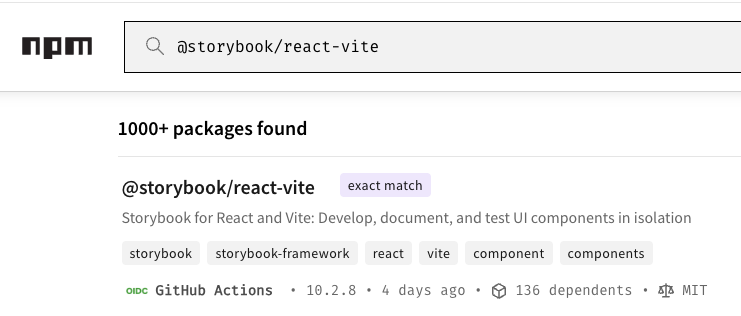
There is a trustPolicyExclude option that allows you to disable the downgrade checks in situations like this. Storybook is published as lots of separate packages. My first try at an exclude rule was @storybook/*@9.*. Unfortunately, only exact versions are allowed.
It didn’t like @storybook/*@9.1.7 either. You can’t use name patterns if you specify a version. That leaves me with the choice of listing every Storybook package and version individually, or excluding all Storybook versions, including the ones that should have trust evidence.
There’s also an option to ignore trust policy checks beyond a certain age. Storybook 9.1.17 was released a couple of months ago. I added trustPolicyIgnoreAfter: 43200 to allow anything older than a month. If there is a package takeover it will be noticed much sooner. After that, the update worked.
Everyone has to follow the rules
Looking at the changes the update made, I see that tldts has been downgraded from 7.0.22 to 7.0.21. Then I realized.
I must have already installed 7.0.22 manually with npm before upgrading to pnpm. The minimum release age constraint is also applied to packages that are already installed.
Compared with npm, pnpm updates many more packages. I think the difference is that pnpm updates all transitive dependencies. It looks like npm only updates transitive dependencies if the parent dependency was updated.
Dependabot vs pnpm
Dependabot ignores the cooldown option when applying security fixes. There’s no equivalent feature for pnpm. That means dependabot will invariably fail to create security fix PRs because new security fixes are younger than the pnpm minimum release age. You can manually add a pnpm exception but that’s a pain to manage. Even worse, there’s no notification if dependabot fails to create a PR, so I don’t get notified to take manual action.
Dependabot isn’t great at dealing with chains of dependencies when using pnpm to apply security fixes. There’s a vulnerability in @isaacs/brace-expansion 5.0.0, fixed in 5.0.1. Dependabot tries to use pnpm update @isaacs/brace-expansion@5.0.1 but that fails because version 5.0.0 is pinned by minimatch 10.1.1. The version is updated in minimatch 10.1.2.
There’s no constraint preventing an update to 10.1.2 but because dependabot has limited updates to @isaacs/brace-expansion it fails. Dependabot should use pnpm update ...@isaacs/brace-expansion@5.0.1 instead. This updates @isaacs/brace-expansion and all packages that depend on it.
Running pnpm update manually sorted it out.
Conclusion
I’m pleased that pnpm has taken supply chain attack mitigation seriously and prioritized these enhancements. It’s a shame that dependabot hasn’t been able to keep up with the rapid progress in pnpm. Formal support for pnpm was added in 2023 but it seems that dependabot still hasn’t worked through all the rough edges.
Hopefully things will improve when dependabot catches up. Until then, dependabot is still magical when it works. When it doesn’t, I have pnpm to do the heavy lifting.