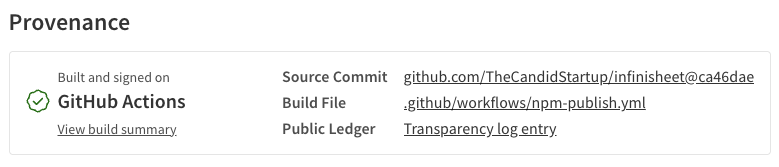
I’m putting my money where my mouth is. NPM provenance statements are great. Everyone should publish packages with a provenance statement. Including me.
This is an updated version of Bootstrapping NPM Provenance with GitHub Actions, originally published June 24, 2024. The previous version used a long-lived access token, which is no longer best practice.
This version uses NPM Trusted Publishers.
I already have a GitHub Actions Build CI workflow, so it should have been easy. It took me longer to get up and running than I would have liked. Mostly down to my own stupidity. At least now that I’ve made the mistakes, you don’t have to.
TL;DR
You need to enable Trusted Publishing at the npm end, then make three changes to a standard GitHub Actions build workflow.
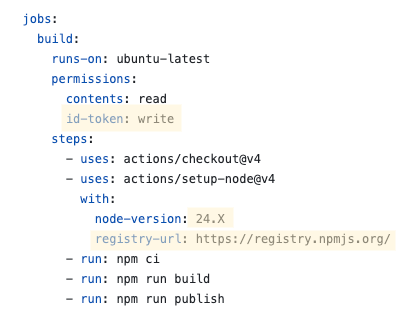
- Give the workflow permission to create an identity token
- Make sure you’re using Node 24.X or later
- Explicitly specify the NPM registry you’re publishing to (even if it’s the default one)
Versioning
My current manual release workflow has separate steps for creating a new version and publishing packages to npm. The versioning step updates version numbers in package.json files, updates CHANGELOG.md files and commits the changes. Once version numbers have been updated, I rebuild the packages and then run the lerna command to publish.
I can continue to run versioning locally or set up a GitHub manual workflow with form inputs that let you choose how new versions should be generated.
I decided that running versioning as a manual GitHub workflow isn’t worth it. It’s simpler and more flexible to continue versioning on my machine then use the push of that commit to trigger publish.
NPM Trusted Publishing
Before I start messing around with GitHub Actions workflows, I need to enable Trusted Publishing in npm for each package. Provenance statements are created automatically when Trusted Publishing is enabled. Trusted Publishing is configured using per-package settings in the npmjs.com UI. That does mean you need to publish an initial version of new packages manually to get access to the settings.
I followed the instructions for each of my packages. Select “GitHub Actions” as your publisher and then configure the three required fields. The settings are the same for each of the packages in my Infinisheet monorepo.
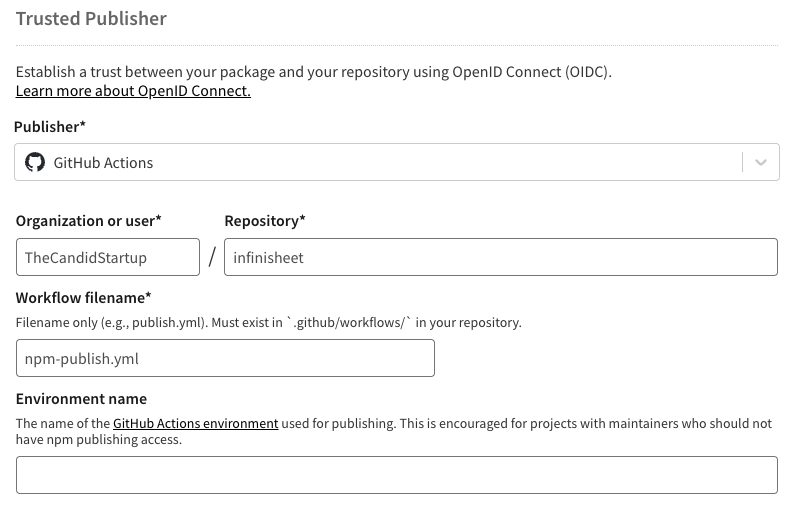
If you use GitHub environments for deployment protection you can specify the environment to use too.
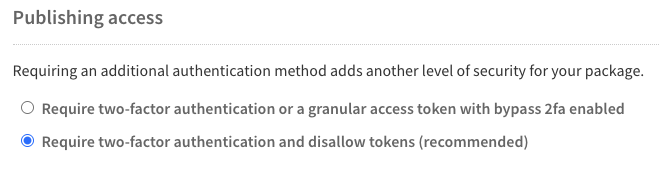
It doesn’t matter what you choose for the Publishing Access configuration as it isn’t used by Trusted Publishing. However, unless you really need to occasionally publish using an access token, it’s best to use the most secure setting.
Publish Automation
So far, straightforward enough. Now I just need to update my Build CI workflow to add publishing. Unfortunately, it took me three attempts to get something that I was happy with.
Attempt 1
My first idea was to add an extra step to the existing Build CI workflow that would run npm run lerna-publish.
I don’t want to publish every build, so I made the publish step conditional. It will only run on a push to main, only for one of the matrix builds and only if the triggering commit was created by lerna version.
- name: Publish to NPM on release
  if: |
      github.ref == 'refs/heads/main' &&
      matrix.node-version == '20.X' &&
      contains(github.event.head_commit.message, 'chore(release)')
  run: npm run lerna-publish
I created a new version for my react-virtual-scroll 0.3.0 release and waited to see what would happen.
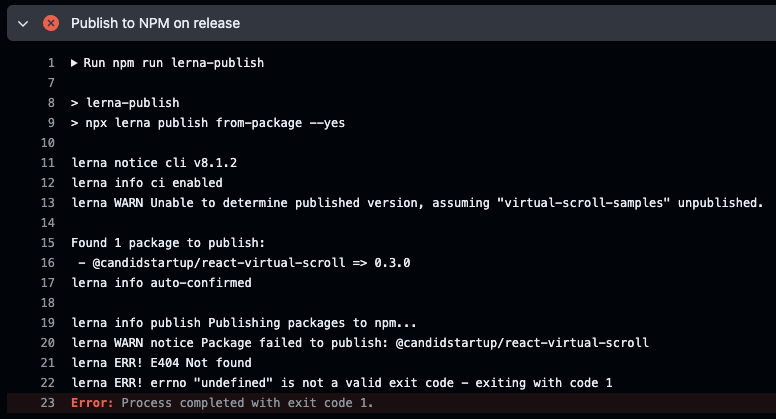
I’ve seen that error before. The same thing happened when I first ran lerna publish on my machine without logging into npm first. It seems likely that authentication with NPM failed.
I’d made two mistakes. First, Trusted Publishing requires npm client 11.5.1 or later. I need to use Node 24.X when publishing.
Second, it turns out that the way GitHub actions handles authentication with npm is a little convoluted. You need to explicitly specify the NPM package registry URL in the setup-node action, even though it’s the default. This triggers setup-node to write a hardcoded .npmrc file to the runner which configures authentication.
My workflow was missing the registry-url: https://registry.npmjs.org line. All I needed to do was add it and rerun.
At this point I realized two things. First, I needed some way of rerunning a publish if something went wrong. Second, tagging publishing onto the end of the “Build CI” workflow meant that my CI build as a whole would fail if something went wrong when publishing.
Attempt 2
I decided to use a separate workflow for publishing. I could configure it to support two triggers. It would be called from the end of the Build CI workflow if the conditions were met or you could trigger it manually. I restructured the Build CI publishing step as a separate job that runs if both the build jobs have succeeded.
publish-if-neeeded:
  needs: build
  if: |
      github.ref == 'refs/heads/main' &&
      contains(github.event.head_commit.message, 'chore(release)')
  uses: ./.github/workflows/npm-publish.yml
Pulling publishing out as a separate workflow also made me realize that I’d forgotten to include the id-token permissions needed for trusted publishing. Here’s the complete workflow.
name: NPM Publish

on: [workflow_dispatch, workflow_call]

jobs:
  build:
    runs-on: ubuntu-latest
    permissions:
      contents: read
      id-token: write
    steps:
      - uses: actions/checkout@v4
      - uses: actions/setup-node@v3
        with:
          node-version: 24.X
          registry-url: https://registry.npmjs.org/
      - run: npm ci
      - run: npm run lerna-build
      - run: npm run lerna-test
      - run: npm run lerna-publish
As it’s a separate workflow, potentially on a different runner, which might be triggered manually, it needs to include all the build steps as well as the publish. I can live with the duplication as it won’t be run that often.
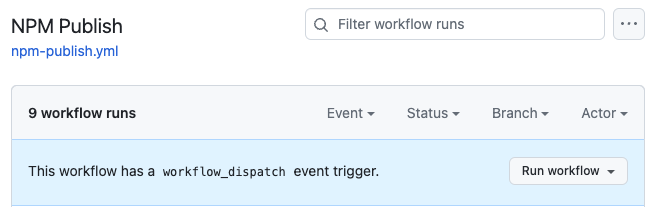
Now I can rerun the publish and see if it gets any further.

That’s a new error. Google came up with no results for TLOG_CREATE_ENTRY_ERROR. Searching GitHub found some hits in sigstore-js, which is part of the sigstore project used by npm to record provenance. It looks like the sigstore library throws that error if it can’t communicate with the sigstore backend.
Which left me stuck. Lerna gives me no context for what might have triggered the error. I couldn’t find any way to enable more verbose logging. I decided to use npm publish directly to see if that would show me more information related to the error.
Run npm publish --workspaces --verbose --provenance --access public

npm notice Publishing to https://registry.npmjs.org/ with tag latest and public access
npm notice publish Signed provenance statement with source and build information from GitHub Actions
npm notice publish Provenance statement published to transparency log: https://search.sigstore.dev/?logIndex=99921087
npm http fetch PUT 200 https://registry.npmjs.org/@candidstartup%2freact-virtual-scroll 2178ms
+ @candidstartup/react-virtual-scroll@0.3.0
Annoyingly it worked first time. Either the error was something intermittent or somehow the way Lerna calls npm publish triggers the error. I was tempted to give up on lerna publish at this point. However, npm publish by itself isn’t enough. It isn’t idempotent.
If you run publish again it will error because the package has already been published. That makes it painful to automate when working in a monorepo. Typically only some of the packages will have changes that need publishing. However, npm publish --workspaces will try and publish all of them. Dealing with this is the value add that Lerna brings.
I decided to try lerna publish again to see if the problem was an intermittent error with the sigstore backend. Of course as I had already published the react-virtual-scroll 0.3.0 package, Lerna refused to try publishing again no matter how I tried to force it. I needed to create version 0.3.1 and trigger the publish via Build CI. It failed again, but back to the authentication error. Which is really weird.
On further reading it seems that workflow dispatch is more like a subroutine call than triggering an independent workflow. There’s lots of complex language explaining which bits of context come from the calling workflow and which from the called workflow. Maybe the resulting frankenstein combination has messed something up.
I’ve also still got the problem where a publish failure results in failure of my Build CI workflow.
Attempt 3
There’s another way of chaining workflows. You can use completion of one workflow as the trigger condition for another. The first workflow doesn’t need to know anything about the triggered workflow.
With this approach I can pull all the publishing related code out of the Build CI workflow. In fact, I just reverted it back to the way it was originally. Now all the conditional logic for triggering a publish is part of the publish workflow. The conditions are at the job level, so GitHub Actions can decide whether to skip the job without having to spin up a runner first.
name: NPM Publish

on:
  workflow_dispatch:
  workflow_run:
    workflows: [Build CI]
    types: [completed]

jobs:
  build:
    if: |
        github.event_name == 'workflow_dispatch' ||
        ( github.event.workflow_run.conclusion == 'success' &&
          github.event.workflow_run.event == 'push' &&
          github.event.workflow_run.head_branch == 'main' &&
          contains(github.event.workflow_run.head_commit.message, 'chore(release)'))
    runs-on: ubuntu-latest
    permissions:
      contents: read
      id-token: write
    steps:
      - uses: actions/checkout@v4
      - uses: actions/setup-node@v4
        with:
          node-version: 24.X
          registry-url: https://registry.npmjs.org/
      - run: npm ci
      - run: npm run lerna-build
      - run: npm run lerna-test
      - run: npx lerna publish from-package --yes
I also switched to calling Lerna directly, rather than via an npm script, so that I could tweak the command line without having to edit another file.
For whatever reason, this time it worked.

Conclusion
In the end, it was easy. Most of my problems came from trying to do three things at once. As well as enabling provenance statements, I was also figuring out where to fit publishing into my existing workflow and how to setup GitHub actions to authenticate with NPM.
After all that it came down to making three changes to a basic build workflow that runs your existing build scripts. Two lines to handle authentication with NPM, and one line to ensure that the version of Node you’re using includes an npm client that supports Trusted Publishing.
Here’s the proof. Now you can consume with confidence.