It’s been a while since I investigated Home Assistant’s concurrency model. I was worried about contention between different automations manipulating the same resource. I came to the conclusion that all automations manipulating the same resource should be merged into one, using the composite automation pattern.
Now it’s time to put theory into practice. I have two automations that modify the charging settings of my Alpha ESS Home Battery. Once changes the settings to prevent the battery discharging while my EV is charging, the other sets a target SOC (state of charge) based on tomorrow’s solar generation and heating forecasts.
The problem is that there’s a single action which changes all the settings. Each automation does the equivalent of a read-modify-write to change the settings its interested in. If the two automations run concurrently you can end up in a mess. At the moment I try to avoid the problem by running the target SOC automation at a time when I’m unlikely to charge the EV and blocking it from running if the EV is charging.
Let’s see if we now have the tools to do this right.
Composite Automation Pattern
The Composite Automation Pattern uses multiple triggers combined with a choose action. The choose action executes a different set of sub-actions for each trigger id. In my case, I’ll have triggers for start charging, end charging and forecast updated.
The automation uses queued mode which prevents concurrent execution and makes sure that any concurrent triggers are queued up and run when the previous invocation has completed.
Refactoring
The Composite Automation Pattern works best when automations are focused on modifications of the shared resource. In queued mode, automation actions are equivalent to a critical section. You want to keep them as short as possible and in particular avoid including unrelated asynchronous operations.
Anything that doesn’t need to be inside the critical section should be factored out into a separate automation.
Extracting Dispatched Off-Peak Tracking
The current battery management automation is conceptually simple. We force home battery charging on when Octopus has scheduled a smart charge session. If this happens during peak hours we’ll only be charged off-peak rates. The difficult part is determining when these “dispatched” off-peak periods occur.
The Octopus API accessed via the Octopus Home Assistant integration reports planned dispatches. These are the periods when smart charging is planned. They change often, sometimes at the last minute before a session starts.
The planned dispatches data is retrieved via polling a rate limited API. It can be up to five minutes out of date. Sometimes the car starts charging before the dispatch is confirmed.
Instead of using the planned dispatches data, the automation uses EV charging as the trigger. Unfortunately, there’s more complexity. There are occasional transient spikes of charging, typically only a few seconds and low total energy used. I don’t know if this is a problem with Octopus or the charger. The spikes don’t trigger off-peak rates. There’s extra logic to filter them out.
The current automation is mixing concerns. The battery management automation should react to start/end dispatched off-peak periods. All the complexity of figuring out when those periods start and end should be factored out.
Dispatched Off-Peak Automation
I added a boolean helper to represent the “Dispatched Off-Peak” state, together with an automation that turns it on and off. This approach gives a lot more flexibility than trying to implement it all-in-one as a template sensor.
I’m using the composite automation pattern here too, mostly to keep all the logic in one place. There’s no concurrency issues as there are no asynchronous operations. We’re just reacting to changes in state and updating our helper state.
Extracting the logic like this made it easy to fix a couple of nagging issues. First, the hypervolt_charging state sometimes takes a minute or two to change to off when a dispatched period ends. When this happens the charging current drops to 0.7A immediately and then drops to 0A after a minute or two. I added hypervolt_charger_current < 1A as an additional trigger for the end of charging.
That introduces a new transient spike. Sometimes the charger current will drop to 0.7A and then jump back up to 30A after a minute or two. This typically happens when there are two back-to-back dispatched periods. To handle this I added hypervolt_charger_current > 2 as an additional trigger for the start of charging.
Finally, I now make the most of the Octopus pricing structure. Prices are fixed during each half-hour period during the day. If a dispatch only covers part of a half-hour period, you are still charged off-peak rates for the entire period. If the charger is turned off part way through a half-hour period, I leave dispatched_off_peak_electricty on until the end of the current half-hour.
As time isn’t precisely synchronized between Home Assistant, the Hypervolt Charger and the Octopus backend systems, I treat any end of charging within two minutes of a half-hour boundary as the end of a period.
triggers:
  - trigger: numeric_state
    entity_id: sensor.hypervolt_session_energy
    above: 10
    id: hypervolt_on
  - trigger: numeric_state
    entity_id: sensor.hypervolt_charger_current
    above: 2
    id: hypervolt_on
  - trigger: time_pattern
    minutes: /30
    id: end_period
  - trigger: state
    entity_id: switch.hypervolt_charging
    from: "on"
    to: "off"
    id: hypervolt_off
  - trigger: numeric_state
    entity_id: sensor.hypervolt_charger_current
    below: 1
    id: hypervolt_off
actions:
  - choose:
      - conditions:
          - condition: trigger
            id: hypervolt_on
          - condition: state
            entity_id: switch.octopus_energy_XXXXX_intelligent_smart_charge
            state: "on"
          - condition: state
            entity_id: switch.hypervolt_charging
            state: "on"
          - condition: numeric_state
            entity_id: sensor.hypervolt_session_energy
            above: 10
        sequence:
          - action: input_boolean.turn_on
            metadata: {}
            target:
              entity_id: input_boolean.dispatched_off_peak_electricity
            data: {}
      - conditions:
          - condition: trigger
            id: end_period
          - condition: state
            entity_id: input_boolean.dispatched_off_peak_electricity
            state: "on"
          - condition: state
            entity_id: switch.hypervolt_charging
            state: [ "off", unknown, unavailable ]
        sequence:
          - action: input_boolean.turn_off
            metadata: {}
            target:
              entity_id: input_boolean.dispatched_off_peak_electricity
            data: {}
      - conditions:
          - condition: trigger
            id: hypervolt_off
          - condition: template
            alias: Within a minute of 30 minute period boundary
            value_template: |-
              {% set minute = now().minute %}
              {{ minute > 58 or minute < 2 or (28 < minute < 32) }}
        sequence:
          - action: input_boolean.turn_off
            metadata: {}
            target:
              entity_id: input_boolean.dispatched_off_peak_electricity
            data: {}
mode: queued
max: 4
Extracting “Dispatched Off-Peak Electricity” as a separate helper lets us reuse the logic for other purposes. I have a template sensor that tracks overall “Off-Peak” periods combining scheduled and dispatched. Previously, that duplicated this logic. Now, it’s a simple template sensor that combines two other entity values.
Home Battery Management Automation
After that refactoring, the battery management automation is far simpler, and just focused on changing the battery settings.
alias: Force charge battery during Octopus Intelligent Smart Charge
triggers:
  - trigger: state
    entity_id: input_boolean.dispatched_off_peak_electricity
    to: "on"
actions:
  - action: alphaess.setbatterycharge
    data:
      cp2start: "05:30"
      cp2end: "23:30"
      chargestopsoc: "{{ states('input_number.alpha_ess_target_soc') }}"
  - wait_for_trigger:
      - trigger: state
        entity_id: input_boolean.dispatched_off_peak_electricity
        to: "off"
  - action: alphaess.setbatterycharge
    data:
      cp2start: "00:00"
      cp2end: "00:00"
      chargestopsoc: "{{ states('input_number.alpha_ess_target_soc') }}"
mode: restart
Cold Weather Day Time Car Charging
The changes so far are already a win. I have a 10kWh home battery. It’s not big enough to run the heat pump all day during cold weather. Once the battery runs out, we have to use peak price electricity directly from the grid.
Octopus are changing their terms for the Intelligent Go tariff. Smart charging at off-peak prices will be limited to 6 hours a day. The idea is to encourage you to plug the car in more often, giving Octopus more opportunity to optimize when charging happens.
I’m happy to comply. I used to add 50% once or twice a week. I now plug the car in first thing each morning, adding 10% each day. This gives Octopus the maximum chance of scheduling day time charging periods.
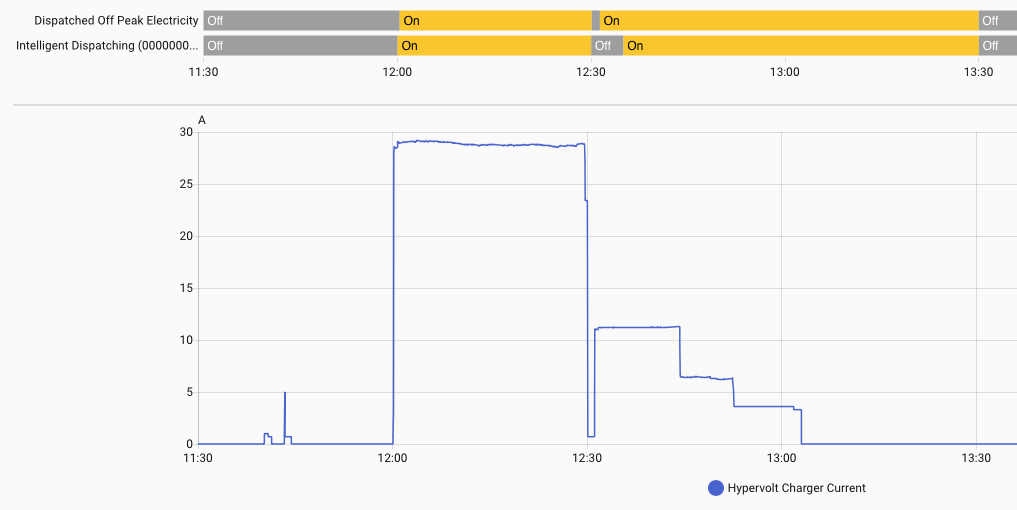
The Octopus Home Assistant integration provides an “Intelligent Dispatching” entity which uses planned dispatches responses from the API to predict when smart charging is occurring. Notice that for the second period it starts 5 minutes after the car starts charging. This is because the previous poll of the API happened just before the start of the dispatch.
Our “Dispatched Off Peak Electricity” helper is bang on, mirroring the Hypervolt charger. Octopus helpfully scheduled an extra 5 minutes of charging after 13:00 which means the entire 13:00 to 13:30 period should be charged at off-peak rates. We take full advantage, extending the “Dispatched Off Peak” period to the next half hour boundary.
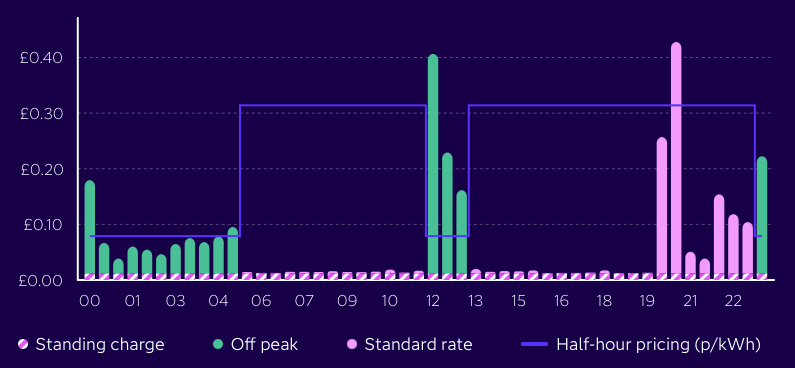
Yes, I did confirm that Octopus charged off-peak rates for the entire 12:00 to 13:30 period. That gave us enough extra juice for the battery to last until peak shower time in the evening.
Day Time Hot Water Boost
We heat hot water overnight during the scheduled off-peak period and then on-demand during the day if we run out. Now that I have a dispatched_off_peak_electricity entity, I can schedule additional pre-emptive hot water runs during dispatched off peak periods during the day.
Some care is needed. A hot water run takes 20-30 minutes and unlike EV charging can’t be stopped and started without wasting a lot of energy. I trigger a hot water boost in the first few minutes of a half-hour period so I know that the off-peak rate will last for long enough.
triggers:
  - trigger: state
    entity_id: input_boolean.dispatched_off_peak_electricity
    to: "on"
    for: { hours: 0, minutes: 2, seconds: 30 }
    id: off_peak_start
  - trigger: time_pattern
    minutes: "02"
    id: period_start
  - trigger: time_pattern
    minutes: "32"
    id: period_start
conditions:
  - condition: time
    after: "09:00:00"
    before: "21:00:00"
  - condition: numeric_state
    entity_id: sensor.home_domestic_hot_water_0_tank_temperature
    below: 45
  - condition: state
    entity_id: switch.home_domestic_hot_water_0_boost
    state: "off"
actions:
  - choose:
      - conditions:
          - condition: trigger
            id: off_peak_start
          - alias: Started within first 10 minutes of period
            condition: template
            value_template: |-
              {% set minute = now().minute %}
              {{ (1 < minute < 10) or (31 < minute < 40) }}
        sequence:
          - action: switch.turn_on
            target:
              entity_id: switch.home_domestic_hot_water_0_boost
      - conditions:
          - condition: trigger
            id: period_start
          - condition: state
            entity_id: input_boolean.dispatched_off_peak_electricity
            state: "on"
            for: { hours: 0, minutes: 2, seconds: 0 }
        sequence:
          - action: switch.turn_on
            target:
              entity_id: switch.home_domestic_hot_water_0_boost
mode: single
There’s two different cases to handle. The first case is when the dispatch starts during the first 10 minutes of the half-hour. The second is when the dispatch started later in the previous half-hour but is still active at the start of the next half-hour.
Home Battery Management Refactor
All that’s left is to complete the Home Battery Management refactor and switch to the composite automation pattern.
I’ve kept the existing separate automation that calculates a target SOC based on solar and heating forecasts. I’ve removed the final action that changes the SOC setting on the battery. That’s now done by the battery management automation, triggered by the change in alpha_ess_target_soc.
  - trigger: state
    entity_id: input_boolean.dispatched_off_peak_electricity
    to: "on"
    id: off_peak_on
  - trigger: state
    entity_id: input_boolean.dispatched_off_peak_electricity
    to: "off"
    id: off_peak_off
  - trigger: state
    entity_id: input_number.alpha_ess_target_soc
    to: null
    id: update_soc
actions:
  - choose:
      - conditions:
          - condition: trigger
            id: off_peak_on
        sequence:
          - action: alphaess.setbatterycharge
            data:
              cp2start: "05:30"
              cp2end: "23:30"
              chargestopsoc: "{{ states('input_number.alpha_ess_target_soc') }}"
      - conditions:
          - condition: trigger
            id: off_peak_off
        sequence:
          - action: alphaess.setbatterycharge
            data:
              enabled: true
              cp2start: "00:00"
              cp2end: "00:00"
              chargestopsoc: "{{ states('input_number.alpha_ess_target_soc') }}"
      - conditions:
          - condition: trigger
            id: update_soc
        sequence:
          - if:
              - condition: state
                entity_id: input_boolean.dispatched_off_peak_electricity
                state: "on"
            then:
              - action: alphaess.setbatterycharge
                data:
                  cp2start: "05:30"
                  cp2end: "23:30"
                  chargestopsoc: "{{ states('input_number.alpha_ess_target_soc') }}"
            else:
              - action: alphaess.setbatterycharge
                data:
                  cp2start: "00:00"
                  cp2end: "00:00"
                  chargestopsoc: "{{ states('input_number.alpha_ess_target_soc') }}"
mode: queued
max: 4
When updating the battery SOC, I need to make sure the charging period is set as it should be based on the “Dispatched Off-Peak” helper. I could have used some templating magic to do it with a single action but it was quicker to add an if and copy the setbatterycharge actions I already had for the then and else clauses.
Conclusion
I now have a good foundation for more complex logic. For example, in the summer I could let the battery discharge to target SOC if it was above the desired level when charging starts. I could re-calculate the target SOC several times during the day based on current state and the forecast for the remains of the day.