The typical playbook for a supply chain attack is to use some form of social engineering to compromise a maintainer’s account, then use that account to directly publish compromised packages to npm. Maintainers are fighting back by removing direct publishing credentials and moving to trusted publishing pipelines like GitHub Actions. Consumers are protecting themselves by verifying package integrity and enforcing cooldowns before newly published packages can be consumed.
As we make one route more difficult, attackers will switch to another. One alternative is to use a compromised maintainer’s account to push compromised code to the repo which GitHub Actions will automatically build and publish. This is more work for the attacker, is easier to spot and extends the window between compromise and exploit.
The simplest mitigation is to increase friction in the publishing process. For example, by requiring manual sign off with two factor authentication. Unfortunately, GitHub doesn’t support using both trusted publishing and 2FA. Hopefully this will be addressed soon.
Attackers can achieve a better payback by compromising the build and publishing workflow itself. GitHub Actions, like the name suggests, builds workflows out of combinations of actions. GitHub provides some basic actions of its own together with a thriving marketplace for third party actions. A compromise of a popular action would have a huge blast radius.
GitHub recently published a roadmap for improved GitHub actions security, with changes available within 6 months. The big surprise for me is that, contrary to what you’d expect from the trusted publishing hype, GitHub actions builds are not deterministic/reproducible.
Most of the heavy lifting is done by individual actions whose code is retrieved at runtime from their own repos. Typically, version tags are used to determine the version of each action used. Tags can be moved between commits, so an attacker could push their own changes to a compromised action repo and then move the current release tag to the compromised version. Any build will look exactly the same as an uncompromised one.
The roadmap includes improvements to action dependency management as well as more fine grained permissions. More recently, GitHub put out a blog post on things that you can do now. There is also existing security guidance in the GitHub Actions documentation.
CodeQL Scanning
The first suggestion is to enable CodeQL scanning for your GitHub actions workflows. CodeQL checks for many common security problems.
I’ve been reluctant to enable CodeQL due to my past experience with automated code scanning tools. You usually see huge numbers of false positives with significant work required to review issues and tune settings.
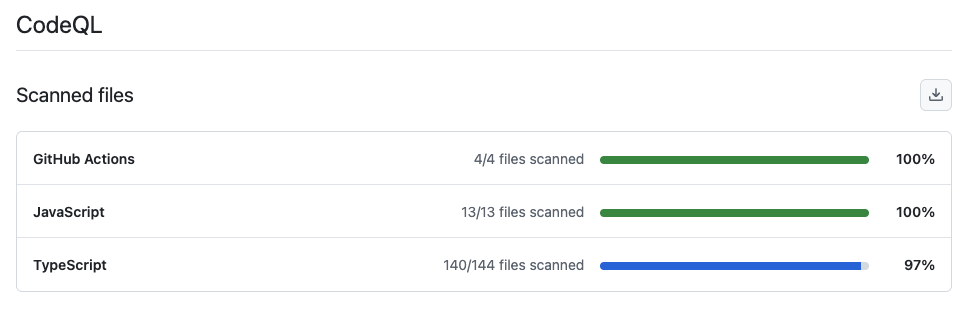
Enabling CodeQL was easy. I went for the automated setup which suggested scanning the GitHub Actions workflows and JavaScript/TypeScript source files it found in my repo. By default, scans run weekly and after every change.
I checked back after an hour and the initial scan had completed.
Click on Tools to see more information on what was scanned.
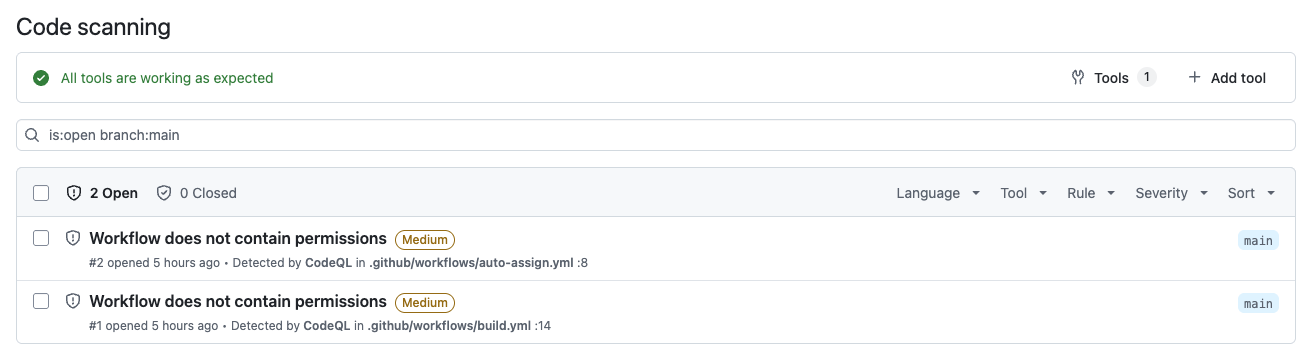
CodeQL found two issues in my GitHub workflows, both real problems.
Least Privilege
By default, workflows and the actions they run have full read/write access to most things accessible via the GitHub API. You can restrict permissions at the workflow or individual job level. You should give each action the minimum permissions required for the job, minimizing the blast radius if the action is compromised.
Both issues found by CodeQL are workflows with no defined permissions. I restricted my build workflow to contents: read. There’s no need to write anything and no access required beyond the content of the repo.
The other problem is in a utility workflow that automatically assigns newly created PRs to me. It just needs pull-requests: write permission.
Pin Third Party Actions
I use two third party actions. One does the heavy lifting for my auto-assign workflow, the other is used to setup the pnpm package manager. The version of each action used is identified by tag, making them easy to exploit if their repos are compromised.
GitHub allows you to identify the version to use by SHA or tag. Using a SHA pins the version used to the corresponding commit. My auto-assign workflow looks like this.
permissions:
  pull-requests: write
steps:
  - uses: kentaro-m/auto-assign-action@v2.0.0
After versioning by SHA, it looks like this.
    permissions:
      pull-requests: write
    steps:
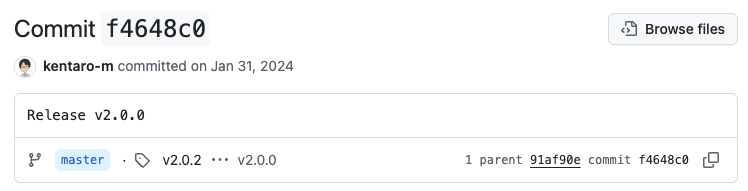
      - uses: kentaro-m/auto-assign-action@f4648c0a9fdb753479e9e75fc251f507ce17bb7e # v2.0.0
It’s helpful to include the corresponding release tag as a comment. To find the SHA you need to go to the action’s repo, then releases, then the commit corresponding to the release you want. Click on the copy icon (two squares at bottom right) to copy the full SHA.
Dependabot Updates
You might think this will become a nightmare to maintain. However, you can configure Dependabot to create PRs to keep your actions up to date. Like other version updates, a branch is created and workflows triggered by code changes are run.
version: 2
updates:
  - package-ecosystem: "github-actions"
    directory: "/"
    schedule:
      interval: "weekly"
      day: "monday"
      time: "03:23"
    cooldown:
      default-days: 7
Obviously, you’ve gained nothing if you just blindly upgrade. It’s sensible to wait a few days as a cooldown, as well as reviewing the changes in the release before merging the update.
If your SHA references a commit with a release tag, Dependabot will create a PR to upgrade to the latest tagged commit. It will also update the tag comment to match.
Dependabot immediately created update PRs for all my actions. Actions run in their own sandboxes with their own version of NodeJS. GitHub recently deprecated Node20, prompting a spate of updates by action maintainers to move to Node24. Something that I was blissfully unaware of until Dependabot brought it to my attention.
Be careful. Dependabot doesn’t look for the Latest tag. Dependabot created a PR that would upgrade to pnpm/action-setup v6.0.0. However, v6.0.0 is a test release that works with a pnpm 11 beta. The v5.0.0 release is the one with the Latest tag. I updated to v5.0.0 by hand.
Pull Request Target
The second thing on the list of things to do now is to stop using the pull_request_target workflow trigger. Unfortunately, it doesn’t say why. My auto-assign workflow uses this trigger.
A post from the time pull_request_target was introduced explains it better. External pull requests reference content from an external fork of your repo. There’s lots of ways that an attacker can modify the fork content to steal secrets that the workflow has access to. That’s why workflows triggered by the standard pull_request trigger only have read access to the pull request and the content of the fork. There’s nothing for an attacker to steal that they don’t already have access to.
The alternative pull_request_target trigger was added to support cases where you want to automate updates to the pull request, such as adding labels, reviewers and assignees. Which is exactly what I’m doing with it.
The problem comes when you checkout code from the external fork, build it and then update the pull request with the results. Workflows triggered by pull_request_target have write access to the target repo, opening up all kinds of opportunities for an attacker.
The right way to handle this use case is to use two separate workflows. The analysis part is triggered by pull_request and has no access to the target repo. Effectively analysis runs in a sandbox with the results uploaded as an artifact at the end of the workflow. You can then trigger a second workflow on completion of the first, which downloads the results and updates the pull request.
In my case, all I’m doing is adding a reviewer to every pull request created. The workflow doesn’t need to touch the fork referenced by the pull request. In fact, with permissions restricted to the pull request itself, it doesn’t have any access to the fork.
Conclusion
It’s well worth getting ahead of the curve and taking basic steps to secure your GitHub Actions.
- Enable CodeQL scanning of your actions
- Make sure all actions have the minimum permissions needed
- Pin third party action versions to a SHA
- Enable Dependabot GitHub Actions updates with a cooldown
- Review changes before committing