We’re ready to start making our event sourced spreadsheet scalable. We have an existing unoptimized tracer bullet implementation that we can evolve, a high level plan for scalable snapshot data structures and a benchmark to track progress.
I’m going to start by changing the current single file snapshot format into one that’s divided into multiple chunks of data that can be loaded on demand. We’re still working tracer bullet style so I’m going to start by defining the additional abstractions needed and then fill in the details later.
Viewport
If we’re going to load parts of our chunked snapshot on demand, we need some way to tell EventSourcedSpreadsheetData which subset of the spreadsheet we’re interested in. We can define a viewport onto the spreadsheet. This is usually the portion of the spreadsheet visible on-screen.
export interface SpreadsheetViewport {
  rowMinOffset: number,
  columnMinOffset: number,
  width: number,
  height: number
}
The viewport origin is specified using the same ItemOffsetMapping offsets used to determine the position and sizes of cells in the React VirtualSpreadsheet control. The same units are used to specify the width and height of the viewport.
I added a setViewport method to EventSourcedSpreadsheetData. This is a hint to the implementation that only data in the viewport is currently of interest. You can control whether the initial viewport is empty or covers the entire spreadsheet (the default) via the options object passed to the constructor.
The React VirtualSpreadsheet control sets viewport to the current visible area and updates it as the user scrolls around the spreadsheet. Our Storybook example creates an EventSourcedSpreadsheetData instance with an initial empty viewport. Content can’t be loaded until we know what’s visible.
So far this is just an additional property that doesn’t do anything.
Multi-Chunk Snapshot Format
My first step towards a multi-chunk snapshot format is setting up a structure. A snapshot is now a blob dir containing an “index” metadata blob and a tiles subdir containing tiles of content. Tiles are named based on their origin (rowMin,colMin) and size (rowCount,ColCount).
For now, the metadata consists of just the overall spreadsheet rowCount and colCount. All content is saved as a single tile.
I added an internal SpreadsheetSnapshot class to manage the in-memory representation of a snapshot.
export class SpreadsheetSnapshot {
  async saveIndex(): Promise<Result<void,StorageError>>;
  async loadIndex(): Promise<Result<void,StorageError>>;
  async saveTile(rowMin: number, colMin: number, rowCount: number, colCount: number,
    blob: Uint8Array): Promise<Result<void,StorageError>>;
  async loadTile(rowMin: number, colMin: number, rowCount: number, colCount: number):
    Promise<Result<Uint8Array,StorageError>>
}

export async function openSnapshot(rootDir: BlobDir<unknown>, snapshotId: BlobId):
  Promise<Result<SpreadsheetSnapshot,StorageError>>;
There’s an openSnapshot function to create an instance. You can then either load the index and then individual tiles, or save a set of tiles and then save a corresponding index.
The current LogSegment now has snapshotId and snapshot members. The engine opens the snapshot on demand when data is first loaded from it. Finally, rowCount and colCount are loaded from the snapshot rather than calculated from the cell map. Ready for when we partially load from snapshot tiles.
Snapshot creation has been refactored to use openSnapshot, saveTile, saveIndex to create a snapshot.
Six Months Later …
At this point I stepped away for a week or two to play with Home Assistant. Somehow it’s now six months later and I’m struggling to remember where I’d got to.
Before picking up development again, I switched to trusted publishing, got all my dependencies back up to date and changed package manager to pnpm.
As part of that process I had to re-publish packages twice, despite being part way through a rewrite. All the unit tests and playwright tests passed. However, there was one thing that wasn’t right.
The bug that wasn’t
This is my Storybook for messing around with the event sourced spreadsheet data implementation.
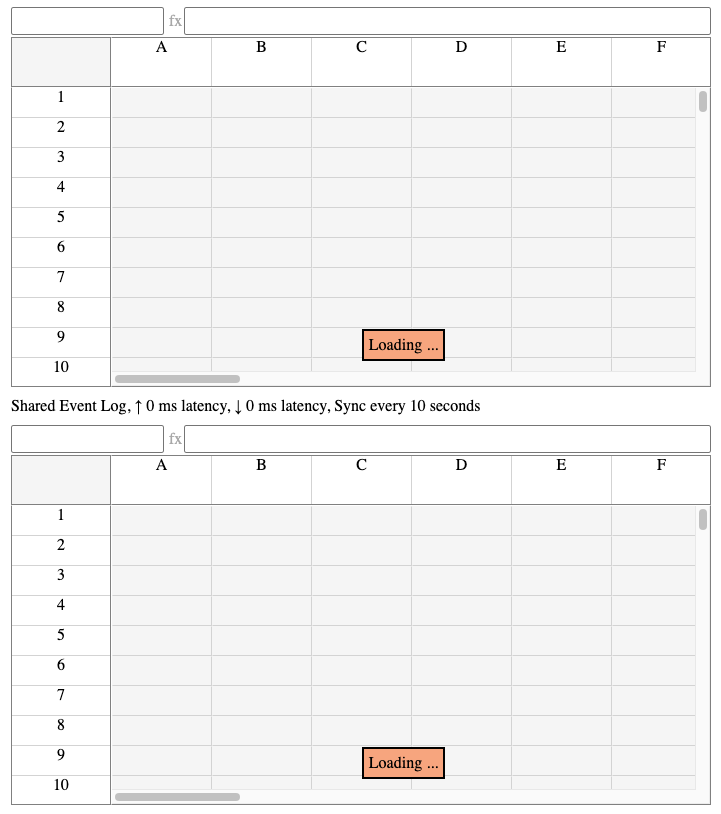
When you open the story you get an initial “loading” tooltip that never goes away. Everything is still functional and the tooltip does go away if you enter some data into the spreadsheet.
Normally, fixing a bug is a good way to get reacquainted with a code base. And it did help, it just wasn’t a bug. It turns out it’s simply down to the current incomplete implementation.
Loading status now tracks both event log and cell map state. Previously both load together. We’re moving to an implementation where only the part of the cell map in the viewport will be loaded. We’ll need to load more if the viewport changes.
VirtualSpreadsheet sets the viewport to the visible area once it knows what it is. The setViewport method clears the cell map loaded flag as new data needs to be loaded. Which is where I stopped six months ago.
I need to add the incremental loading implementation.
Viewport Cell Range
The first problem I ran into was an impedance mismatch. The viewport is defined in terms of ItemOffsetMapping offsets (effectively pixels). The data I’m loading is defined in terms of cell rows and columns. I can use ItemOffsetMapping to convert between the two but it’s clumsy. The row and column ItemOffsetMapping are defined at the EventSourcedSpreadsheetData level but data loading happens in the base class EventSourcedSpreadsheetEngine.
In the end I made a simplifying assumption. The engine would work entirely in terms of cell ranges. EventSourcedSpreadsheetData will be responsible for converting the viewport into a cell range.
I added a CellRangeCoords type and associated utility functions. The setViewport method on EventSourcedSpreadsheetData converts the viewport and calls setViewportCellRange on the engine.
This is all I need for now as currently the item offset mappings are fixed (all cells have the same size). I’ll have to revisit this once I support variable size cells. The viewport cell range will also need updating when:
- Items change size
- Inserting/deleting a row/column if the row/column added/removed from the viewport as a result has a different size
Tile Map
Based on my notes from six months ago, it looks like the next step was to load just the cells in the viewport into the in-memory cell map. On reflection, this seems like the wrong way to go. It would mean reloading on any change to the viewport, even scrolling down one line.
You could have a complex mechanism for caching tiles in memory to speed up reload and support incremental reload for small changes to the viewport. However, it feels wasteful.
The alternative is to load each tile into it’s own cell map. Each tile is loaded and parsed once. When reading the value of a cell, you go directly to the cell map for the tile that contains it. It makes it easy to write out multi-chunk snapshots, just serialize each per-tile cell map.
I added a SpreadsheetTileMap interface so that I could abstract the implementation details behind it.
export interface SpreadsheetTileMap {
  addEntries(log: SetCellValueAndFormatLogEntry[], baseIndex: number): void;
  addEntry(row: number, col: number, logIndex: number, v: CellValue, fmt?: CellFormat): void;
  findEntry(row: number, col: number, snapshotIndex: number): CellMapEntry|undefined;

  loadTiles(src: SpreadsheetSnapshot|undefined, log: SetCellValueAndFormatLogEntry[],
    forceExist: boolean, range?: CellRangeCoords): Promise<Result<void,StorageError>>;

  saveSnapshot(src: SpreadsheetSnapshot|undefined, log: SetCellValueAndFormatLogEntry[],
    rowCount: number, colCount: number, destSnapshot: SpreadsheetSnapshot,
    snapshotIndex: number): Promise<Result<void,StorageError>>;

  loadAsSnapshot(src: SpreadsheetTileMap, snapshotIndex: number): void;
}
The addEntries, addEntry and findEntry methods are equivalent to those on SpreadsheetCellMap. The tile map determines the corresponding cell map and forwards the calls on. Calls are only forwarded on if the corresponding tile has been loaded.
The engine is responsible for calling loadTiles to ensure that any tiles that intersect the viewport cell range are loaded. When tiles are loaded, any relevant entries in the log need to be applied to the tile’s cell map. If forceExist is true, empty tiles are created if there’s no snapshot or the snapshot doesn’t cover the entire viewport. The tile map implementation is responsible for determining how tiles cover the spreadsheet space.
The saveSnapshot method is responsible for writing tiles to the destination snapshot, reading tiles as needed from a source snapshot and applying entries from the log.
Finally, loadAsSnapshot forwards on to the corresponding cell map method for each tile loaded.
SingleTileMap
To validate the SpreadsheetTileMap interface I created a SingleTileMap implementation. This refactors the current single tile, multi-chunk snapshot format implementation as a tile map.
There’s one new bit of functionality. Instead of loading the single tile when the snapshot is opened, it’s now loaded on demand if it intersects the current viewport.
Sounds simple, but there were some interesting ramifications.
Spreadsheet Engine
It took me a while to figure out where I needed to add calls to loadTiles. Obviously, when a snapshot is loaded, we need to load any tiles in the viewport cell range. However, we also need to call loadTiles with the forceExist flag when new entries are added to the event log when there’s no snapshot or when the entries target a cell that has no corresponding tile in the snapshot.
Spreadsheet Data
The changes seemed more straightforward in EventSourcedSpreadsheetData. I added loadTiles at the end of the setViewport method and inserted a call into the chain of async operations that implements setCellValueAndFormat.
setCellValueAndFormat(row: number, column: number, value: CellValue,
  format: CellFormat): ResultAsync<void,SpreadsheetDataError>
{
  const curr = this.content;
  const entry: SetCellValueAndFormatLogEntry =
    { type: 'SetCellValueAndFormat', row, column, value, format };

  return this.addEntry(curr, entry).andThrough((_addEntryValue) => {
    if (this.content !== curr)
      return ok();

    const { logSegment, tileMap } = curr;
    return new ResultAsync(tileMap.loadTiles(logSegment.snapshot, logSegment.entries, true,
      [row, column, row, column]));
  }).map((addEntryValue) => {
    if (this.content === curr) {
      // Success case - update tile map and content
    }
  }).mapErr((err): SpreadsheetDataError => {
    // Error case - return appropriate error
  });
}
We start, as before, by adding an entry to the event log. Then if that succeeds, we make sure the tile containing the updated cell is loaded. The rest is as before, updating the tile map and spreadsheet content on success.
Unfortunately, my unit tests fail almost immediately. Everything looks like it worked but when you try to read the updated value back it’s as if nothing was changed. Which is exactly what happened.
I stepped through in the debugger and the success case is ignored because the current spreadsheet content has changed since the first step. This check is there because a syncLogs might have been triggered since the previous asynchronous step.
The syncLogs method is triggered regularly on a timer to check whether another client has updated the event log and if so to update our local state. If syncLogs has run between calling addEntry and updating the tile map to match, we don’t need to do anything because syncLogs will have done it for us.
Dangling Promise
Why doesn’t this logic work anymore? The failing unit test creates an EventSourcedSpreadsheetData instance and calls setCellValueAndFormat on it. The problem is that the EventSourcedSpreadsheetData constructor calls syncLogs to initialize internal state from the event log passed in. That in turn calls syncLogsAsync which makes an async call to read data from the event log and returns a promise which syncLogs ignores and leaves dangling.
The call to syncLogsAsync has started but not completed when the unit test calls setCellValueAndFormat. The final step in syncLogsAsync is scheduled after the loadTiles step and before the final success step. It updates the spreadsheet content to show that the initial event log has been loaded but hasn’t seen the newly added entry. We then bail out because the content has changed.
The logic works if an overlapping syncLogs starts after the call to addEntry but not before. The previous version of the code got lucky with the scheduler. Adding the extra async step to setCellValueAndFormat exposed the latent bug.
In hindsight, it’s obvious you’re going to run into trouble if you start an asynchronous operation to read data from the event log and then start changing the event log without waiting for the existing operation to complete. In normal asynchronous code you would await the promise returned by syncLogsAsync before moving on.
The SpreadsheetData interface was designed to be compatible with React’s useSyncExternalStore. That works on the basis of an external store which can change its state at any time and reports changes via a callback. Not a promise in sight.
There’s a tension between the synchronous interface for reading spreadsheet data and the async interface for modifying data. Calls to modify data need to coordinate with the internal syncLogs calls that update the state of the store, without SpreadsheetData clients having to get involved.
The solution I came up with is for EventSourcedSpreadsheetData to hold on to the promise returned by syncLogsAsync in a member variable. Anything that wants to coordinate with the sync logs process can chain off the promise. In fact, I got rid of syncLogs completely and only use syncLogsAsync.
At first I thought I’d need complex logic that determines whether a sync logs process is active and only then use the promise. However, it turns out to be unnecessary due to the guarantees promises provide. You can call then on the same promise multiple times and the handlers will all be called, regardless of whether they were added before or after the promise resolved.
  return ResultAsync.fromSafePromise(this.syncLogsPromise).andThen(() => {
    return this.addEntry(curr, entry);
  }).andThrough((_addEntryValue) => {
    // As before ...
  });
}
All I had to do was add syncLogsPromise to the start of the chain (with an adaptor to ResultAsync). Everything worked from there.
Conclusion
Progress has been made, tests all pass, and the persistent loading tooltip is gone. However, it doesn’t feel great. There’s a lot of coupling between the snapshot and event log. There’s a high chance of more async interference between setViewport, setCellVAlueAndFormat and syncLogsAsync. I need to be more discerning about which changes conflict rather than bailing out on any change to content.
Fortunately, I have a cunning plan which I’ll tell you about next time.